- Generally speaking, programming motion simply means writing a script to repeatedly change the position of a movie clip.
- There are, of course, lots of ways to move something...in a straight line, around a circle, following another object, randomly, etc.
- No matter what the type of motion, every motion algorithm has two main components:
- The code that repeatedly assigns the location of the object.
- The code that calculates where to place the object.
- We'll spend the first part of this lecture learning to build timeline loops and clip event loops, which handle assigning our object's location.
- In the second part of the lecture, we'll study some sample movement-calculation code, and learn how to integrate it with our timeline and clip event loops.
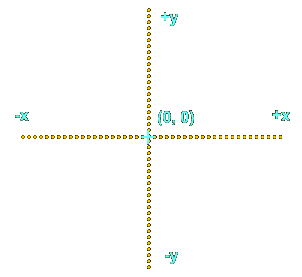
- We use a 2d cartesian grid to plot the location of an object in two dimensions:
- horizontally (the "x-coordinate")
- vertically (the "y-coordinate")
- In a cartesian grid:
- the centre is at point 0, 0 (the origin of the coordinate system)
- a positive y coordinate refers to a point above the x-axis
- a negative y coordinate refers to a point below the x-axis
- a positive x coordinate refers to a point to the right of the y-axis
- a negative x coordinate refers to a point to the left of the y-axis
- In Flash, the top left corner of the main Stage is the origin of the grid.
- But Flash inverts the y-axis:
- a positive y coordinate refers to a point below the x-axis
- a negative y coordinate refers to a point above the x-axis
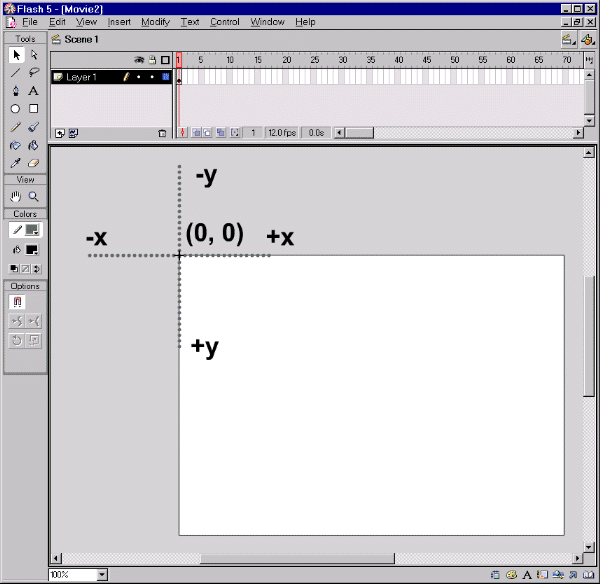
- To calculate the motion of objects, we'll work in cartesian coordinates.
- But, when it's time to actually place an object on the screen in Flash, we'll flip the y-axis (make negatives positive and positives negative).
- To position a movie clip in Flash, we set its
_x and _y properties.
- For example, to place a movie clip named ball in the centre of the main stage we use:
ball._x = 225;

  ball._y = 200;
- To animate a movie clip, we repeatedly change its
_x and _y position by small amounts.
- Consider the following loop statement--it repetitively updates the position of
ball by small amounts, which should give the illusion of movement, right?
for (var i = 0; i < 50; i++) {

  ball._x += 10;

}
- Wrong. When any frame's script is executed, the movie Stage is not updated visually until the end of the script.
- Hence, the results of each loop iteration aren't rendered individually.
- Instead,the ball suddenly jumps 500 pixels to the right after the script completes (10 pixels x 50 loop iterations).
- Repositioning a movie clip requires a Stage update, so we can't programmatically animate a movie clip with a normal loop statement.
- To allow the Stage to update after each execution of the
ball._x += 10; statement, we can use a timeline loop like this:
// Code on Frame 1

ball._x += 10;


// Code on Frame 2

gotoAndPlay(1);
- A timeline loop like the one we just saw completely monopolizes the timeline it's on.
- While the loop is running, we can't play any normal content on that timeline.
- By placing our timeline loop into an empty, two-frame movie clip, we'll get the benefit of a Stage update between loop iterations without freezing a timeline we may need for other animation.
- Here's how to build a more portable timeline loop, starting with a movie that already has a ball movie clip symbol defined:
- Place an instance of the ball symbol on the main timeline.
- Name the instance of the ball clip
ball.
- Select Insert>>New Symbol to create a blank movie clip symbol.
- Name the clip symbol
process.
- On frame 1 of the
process clip, attach the following code:
_root.ball._x += 10;
- On frame 2 of the
process clip, add the following code:
gotoAndPlay(1);
- Return to the main movie timeline and create a layer called
processMove.
- On the
processMove layer, place an instance of the process symbol.