- So far we have learned to:
- make a script repeatedly execute while allowing for a screen update
- measure how far to move an object based on time passing
- We now have a very generic system that can be applied to any specific motion algorithm.
- Let's look at two applied motion algorithm examples:
- moving something in a circle
- moving something in a straight line
- Suppose we have a circle around which we want to move an object.
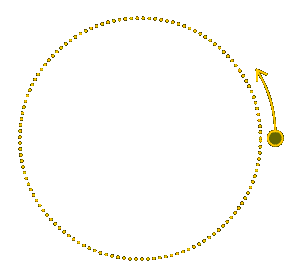
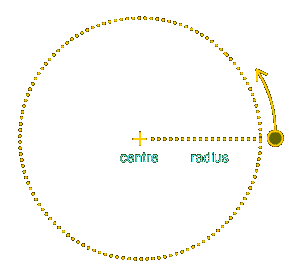
- We know the circle's radius (distance from the centre to the edge of the circle).
- To locate our object somewhere on the circle, we pick an angle, theta, measured relative to a fixed axis called the polar axis.
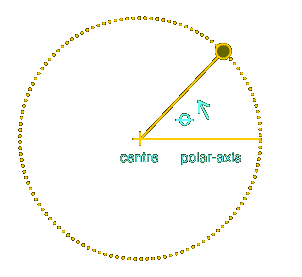
- The radius of the circle, r, and the angle, theta, describe the location of the object in polar coordinates: (r, t).
- To actually place our object in Flash, we must convert from polar coordinates to cartesian coordinates.
- For the sake of convenience, we align our polar axis with the x-axis of a cartesian grid.
- Then we calculate:
- how far the object is to the left or right of the circle's centre (i.e., the x-coordinate)
- how far the object is above or below the circle's centre (i.e., the y-coordinate)
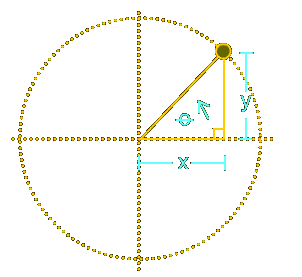
- A little trigonometry does the trick.
- The length of the side opposite to theta (our y-coordinate) is:
sin(theta) * radius
- The length of the side adjacent to theta (our x-coordinate) is:
cos(theta) * radius
- Those formulae tell us the coordinates of our object when our circle's centre is at the origin (0, 0) of a cartesian grid.
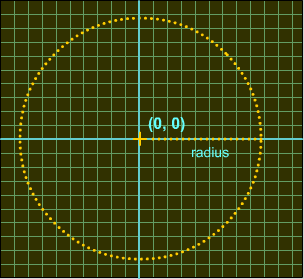
- However, we cannot assume that the circle will always be at (0, 0). It may be offset from the origin.
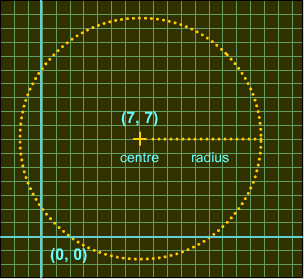
- We must, therefore, add the coordinates of the circle's centre to our object's coordinates, as follows:
xCoord = centerX + cos(theta) * radius

yCoord = centerY + sin(theta) * radius
- So, to move our object around a circle, we do the following with each passing frame:
- update
theta (increment or decrement it)
- calculate the new x and y cartesian coordinates using trigonometry
- place the object at the new coordinates
- Here's some code that actually moves an object in a circle:
// Initialize movement speed and start time.

function init () {

  radius = 100;   // Circle's radius

  theta = 0;      // Angle of object, measured

                  // counterclockwise from the positive x-axis


  centerX = 225;  // Circle's centre x-coordinate

  centerY = 200;  // Circle's centre y-coordinate


  rpm = 10;                 // Revolutions per minute


  // The amount to move per second

  degreesPerSecond = rpm * 360 / 60;


  // The current time

  now = getTimer();

}


// Function to move a clip with each passing frame.

function moveClip (theClip) {

  // Determine how much time has passed

  then = now;

  now = getTimer();

  elapsed = now - then;

  numSeconds = elapsed / 1000;


  // Find out how many degrees to increment this frame.

  degreeIncrement = degreesPerSecond * numSeconds;


  // Update the angle

  theta += degreeIncrement;


  // Keep the angle between -360 and 360 degrees

  theta %= 360;


  // Radian version of theta.

  // Required by cos and sin functions.

  var radians = degreesToRadians(theta);


  // Place the clip on the circle.

  theClip._x = centerX + Math.cos(radians) * radius;

  theClip._y = centerY - Math.sin(radians) * radius;

}


// Converts degrees to radians.

function degreesToRadians(degrees) {

  return (degrees/180) * Math.PI;

}
- We assign our system's variables in the
init() function, borrowed from our generic time-scaled motion code.
- As we learned in our circular motion theory, we describe the location of our object in polar coordinates, using a radius and an angle, theta:
  radius = 100;   // Circle's radius

  theta = 0;      // Angle of object
- We also need to provide the location of our circle's centre point.
  centerX = 225;  // Circle's centre x-coordinate

  centerY = 200;  // Circle's centre y-coordinate
- Next we stipulate how fast the object should move, in RPM (revolutions per minute). A positive RPM moves the object counter-clockwise. A negative RPM moves the object clockwise.
rpm = 10; // Revolutions per minute
- The
rpm variable is convenient for humans, but not too practical for our code, which is based on seconds.
- Therefore, we convert
rpm to the internal variable degressPerSecond, defining how many degrees the object should move around the circle each second.
degreesPerSecond = rpm * 360 / 60;
- Our last job in
init is to note the current time (remember we're scaling our object's motion to time, not frame rate):
now = getTimer();
- With each frame that passes, we'll call the
moveClip() function, which updates the location of our object around its circular path.
- Like
init(), the moveClip() function is borrowed from our generic time-scaled motion code.
moveClip() takes one parameter: the name of the clip to move:
function moveClip (theClip) {
- Our first task in
moveClip() is to measure how much time has passed, in seconds (we've seen this code before):
  then = now;

  now = getTimer();

  elapsed = now - then;

  numSeconds = elapsed / 1000;
- Next, we calculate how many degrees the object should move around the circle based on its rate of speed and the amount of time that has passed:
degreeIncrement = degreesPerSecond * numSeconds;
- We then update the object's angle by that calculated amount of degrees:
theta += degreeIncrement;
- To prevent the angle from going above 360 degrees or below -360 degrees, we use the modulo-assignment operator:
theta %= 360;
- We now have the new location of our object in polar coordinates (radius, angle).
- Our next task is to convert to cartesian coordinates.
- As we learned earlier, we use trigonometric functions to convert to cartesian coordinates.
- ActionScript's trigonometric functions expect angles to be provided in radians, not degrees. (Radians are just another unit of measurement for angles, much like kilometers and miles are both units of measurement for distance).
- So, we convert our angle from degrees to radians using our custom-built
degreesToRadians() function:
var radians = degreesToRadians(theta);
- Finally, we can calculate the x and y coordinates of our object using the formulae we learned earlier:
  theClip._x = centerX + Math.cos(radians) * radius;

  theClip._y = centerY - Math.sin(radians) * radius;
- Notice that we subtract the object's y-coordinate from the
centerY of the circle.
- In Flash, the y-axis is inverted: positive y values are below the x-axis, and negative y values are above it.
- We subtract our y-coordinate to account for the difference between cartesian and flash coordinates.