- To describe the motion of an object moving in a straight line, we use a basic physics concept called velocity.
- Velocity is a quantity that describes the rate at which an object changes position.
- In other words, velocity describes:
- How fast an object is moving.
- What direction an object is moving.
- Here are some sample velocities:
- 16 kilometers per hour, north
- 50 pixels per second, at 20 degrees
- 30 pixels per second, at 250 degrees
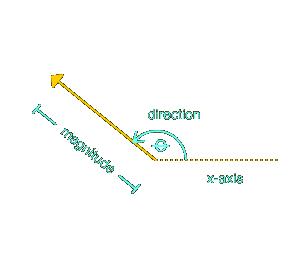
- Velocity is a vector quantity: it has a magnitude and a direction.
- A velocity vector's magnitude is the object's rate of speed (distance/time).
- A velocity vector's direction is simply the direction the object is moving, usually specified as an angle measured counter-clockwise from the positive x-axis.
- To move an object in Flash, we must first:
- Assign the object a velocity vector.
- Resolve the vertical and horizontal components of that vector so the velocity can be applied to a movie clip's
_x and _y location.
- The following diagram shows a velocity vector with:
- a magnitude of 30 pixels per second
- a direction (theta) of 250 degrees
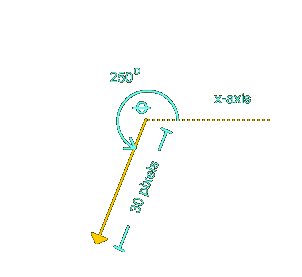
- To find the velocity vector's vertical and horizontal components, we use trigonometry:

- The velocity vector's vertical component (the y-coordinate) is:
sin(direction) * magnitude

= sin(250) * 30 pixels per second

= approximately -28.2 pixels per second
- The velocity vector's horizontal component (the x-coordinate) is:
cos(direction) * magnitude

cos(250) * 30 pixels per second

= approximately -10.3 pixels per second
- Once we've calculated the vertical and horizontal components of our object's velocity vector, we know how far to move it vertically and horizontally every second.
- Of course, frames don't display once per second, so, as usual, we have to measure the time between each frame and move the object by the appropriate amount.
- Here's some code that actually moves an object in a straight line, based on a velocity vector:
// Initialize movement direction, speed, and start time.

function init () {

  velMagnitude = 30;   // Total pixels to travel per second

  velDirection = 250;  // Angle of object, measured

                      // counterclockwise from the positive x-axis


  lastX = 225;  // Object's initial x-coordinate

  lastY = 200;  // Object's initial y-coordinate


  // Convert angle to radians so we can

  // use it with Math.cos and Math.sin.

  var radians = degreesToRadians(velDirection);


  // Pixels to move horizontally each second

  moveX = Math.cos(radians) * velMagnitude;


  // Pixels to move vertically per second

  moveY = Math.sin(radians) * velMagnitude;


  // The current time

  now = getTimer();

}


// Function to move a clip with each passing frame.

function moveClip (theClip) {

  // Determine how much time has passed

  then = now;

  now = getTimer();

  elapsed = now - then;

  numSeconds = elapsed / 1000;


  // Determine the new horizontal location

  // of the clip, based on elapsed time.

  newX = lastX + moveX * numSeconds;


  // Determine the new vertical location

  // of the clip, based on elapsed time.

  newY = lastY - moveY * numSeconds;


  // Place the clip in the appropriate location.

  theClip._x = newX;

  theClip._y = newY;


  // Remember where we placed the clip for next time.

  lastX = newX;

  lastY = newY;

}


// Converts degrees to radians.

function degreesToRadians(degrees) {

  return (degrees/180) * Math.PI;

}
- Just as with our circular motion code, we'll base our straight line code on our generic time-scaled motion code.
- We use the familiar two functions,
init() and moveClip().
- The
init() function performs these tasks:
- Assigns the object a velocity vector.
velMagnitude = 30;   // Pixels per second

velDirection = 250;  // Angle in degrees
- Assigns the object a starting location.
lastX = 225;  // Object's initial x-coordinate

lastY = 200;  // Object's initial y-coordinate
- Calculates the horizontal and vertical components of the object's velocity vector.
var radians = degreesToRadians(velDirection);


moveX = Math.cos(radians) * velMagnitude;

moveY = Math.sin(radians) * velMagnitude;
- Records the time the object started moving.
now = getTimer();
- On to
moveClip(), which takes one parameter: the name of the clip to move:
function moveClip (theClip) {
- Our first task in
moveClip() is, as usual, to measure how much time has passed, in seconds, since the last frame was rendered:
  then = now;

  now = getTimer();

  elapsed = now - then;

  numSeconds = elapsed / 1000;
- Next we calculate how far to move our object horizontally and vertically.
- The
moveX and moveY variables tell us how far to move our object per second.
- By multiplying
moveX by the number of seconds that have passed, we determine how far to move our object horizontally this frame.
moveX * numSeconds
- Our object's new horizontal location is, therefore:
- it's previous horizontal location
- plus the amount to move horizontally this frame
newX = lastX + moveX * numSeconds;
- Ditto for the new vertical location:
newY = lastY - moveY * numSeconds;
- (Except that we subtract the vertical movement because Flash inverts the cartesian y-axis.)
- Now that we know the object's new horizontal and vertical location, we place it there:
theClip._x = newX;

theClip._y = newY;
- Finally, we make a note of the current location--it will be the object's previous location the next time the
moveClip() function runs:
lastX = newX;

lastY = newY;
- Instead of picking a velocity vector and determining its horizontal and vertical components with trigonometry, we could have just picked arbitrary horizontal and vertical components (
xMove and yMove).
- For simple applications, that's perfectly acceptable.
- But working with a velocity vector makes our application easier to extend when we want to add features such as thrust and rotation (think asteroids).