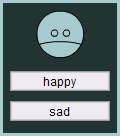
- in this example, we'll use mvc to structure a simple user avatar
- the avatar will appear on screen and can be made either happy or sad via "happy" and "sad" buttons
- avatar: MVCAvatar
- creates and stores model, view, and controller objects
- each instance is an individual avatar
- model: AvatarModel
- stores the avatar's mood
- provides methods to get/set the mood
- view: AvatarView
- movieclip subclass
- corresponding symbol contains avatar graphics on frames labelled "happy" and "sad"
- displays appropriate frame when AvatarModel broadcasts mood change
- creates "happy" and "sad" buttons at runtime
- wires buttons to controller methods, onHappyClicked() and onSadClicked()
- controller: AvatarController
- sets mood in model when happy or sad buttons are clicked
// PACKAGE
AsSetupPackage("org.moock.examples.mvcavatar");

// CLASS MVCAvatar

/**
 * A simple demonstration of the Model View Controller
 * paradigm. This class creates an onscreen avatar that
 * can change mood. The avatar's mood (it's data) is stored
 * in AvatarModel. The avatar's onscreen representation
 * is generated and managed by AvatarView. User input that
 * affects the avatar's mood is handled by AvatarController.
 *
 * @param   mood   The initial mood for this avatar.
 * @param   target   The movie clip in which to place the avatar.
 * @param   depth   The depth in target on which to place the avatar.
 */
org.moock.examples.mvcavatar.MVCAvatar = function (mood,
                             target,
                             depth,
                             x,
                             y) {
  // Create a model to store information about the avatar.
  this.model = new org.moock.examples.mvcavatar.AvatarModel(mood);

  // Create a controller to handle user input.
  this.controller =
    new org.moock.examples.mvcavatar.AvatarController(this.model);

  // Create a view to display the avatar on screen. The view
  // is an instance of AvatarView, a MovieClip subclass.
  this.view  = target.attachMovie("AvatarView",
                                  "avatarview" + depth + "_mc",
                                  depth);
  this.view.init(this.model, this.controller);

  // Position the avatar on screen.
  this.view._x = x;
  this.view._y = y;
}

// PROPERTIES
  org.moock.examples.mvcavatar.MVCAvatar.prototype.model = null;
  org.moock.examples.mvcavatar.MVCAvatar.prototype.view = null;
  org.moock.examples.mvcavatar.MVCAvatar.prototype.controller = null;
// PACKAGE
AsSetupPackage("org.moock.examples.mvcavatar");

// CLASS AvatarModel EXTENDS org.moock.util.Observable

/**
 * The model class for a simple user avatar. This
 * model stores the avatar's mood as a string, and
 * updates all registered views when the mood changes.
 *
 * @param   mood   The avatar's initial mood.
 */
org.moock.examples.mvcavatar.AvatarModel = function (mood) {
  // Invoke Observable's constructor. (Very important! We want
  // to be sure that each model creates its own array of observers).
  super();

  // Set the mood. If the mood specified isn't valid,
  // then default to happy.
  if (!this.setMood(mood)) {
    this.setMood("happy");
  }
}

// SET SUPERCLASS
org.moock.examples.mvcavatar.AvatarModel.prototype =
  new org.moock.util.Observable();

// PROPERTIES
  // The avatar's mood.
  org.moock.examples.mvcavatar.AvatarModel.prototype.mood = null;

// METHODS
  /**
   * Changes the mood for the avatar.
   */
  org.moock.examples.mvcavatar.AvatarModel.prototype.setMood =
                                                          function (newMood) {
    // Convert the supplied mood to lowercase.
    newMood = newMood.toLowerCase();
    // Only set the mood if it's a legal mood and is
    // different than the old mood.
    if ((newMood == "happy" || newMood == "sad")
        && (newMood != this.mood)) {
      this.mood = newMood;
      // Indicate that the model has changed.
      this.setChanged();
      // Create an object with the new mood. This will be
      // pushed to the view so it doesn't have to request the mood.
      var infoObj = new Object();
      infoObj.mood = this.mood;
      // Tell all views that the model has changed.
      this.notifyObservers(infoObj);
      // Tell the caller that mood-setting succeeded.
      return true;
    }

    // Tell the caller that mood-setting failed.
    return false;
  }

  /**
   * Returns the avatar's current mood.
   */
  org.moock.examples.mvcavatar.AvatarModel.prototype.getMood = function () {
    return this.mood;
  }
// PACKAGE
AsSetupPackage("org.moock.examples.mvcavatar");

// CLASS AvatarView EXTENDS MovieClip IMPLEMENTS
// org.moock.util.View, org.moock.util.Observer

/**
 * The view class that displays the avatar on screen,
 * and displays buttons to change the avatar's mood.
 * The button events are handled by an AvatarController.
 */
org.moock.examples.mvcavatar.AvatarView = function () {
  // Do construction work in init().
}

// SET SUPERCLASS
org.moock.examples.mvcavatar.AvatarView.prototype = new MovieClip();

// PROPERTIES
  // The avatar model we're observing.
  org.moock.examples.mvcavatar.AvatarView.prototype.model = null;

  // The controller that handles UI events.
  org.moock.examples.mvcavatar.AvatarView.prototype.controller = null;

  // A button to make the avatar happy.
  org.moock.examples.mvcavatar.AvatarView.prototype.happy_pb = null;

  // A button to make the avatar sad.
  org.moock.examples.mvcavatar.AvatarView.prototype.sad_pb = null;


// METHODS
  /**
   * Initializes the view. This would normally be in the constructor
   * but this view is a MovieClip subclass, so we use an init() method.
   *
   * @param   m   The model.
   * @param   c   The controller.
   */
  org.moock.examples.mvcavatar.AvatarView.prototype.init = function (m, c) {
    // Store the model in a variable.
    this.setModel(m);
    // Register this view with the model.
    this.model.addObserver(this);
    // Store the controller in a variable.
    this.setController(c);
    // Tell the controller that we're it's view.
    this.controller.setView(this);

    // Create happy and sad buttons.
    this.attachMovie("FPushButtonSymbol", "happy_pb", 0);
    this.happy_pb.setLabel("happy");
    this.happy_pb._y = 60;
    this.attachMovie("FPushButtonSymbol", "sad_pb", 1);
    this.sad_pb.setLabel("sad");
    this.sad_pb._y = 90;

    // Link methods in the controller to UI in the view.
    this.happy_pb.setClickHandler("onHappyClicked", this.getController());
    this.sad_pb.setClickHandler("onSadClicked", this.getController());

    // Initialize the avatar view.
    this.gotoAndStop(this.getModel().getMood());
  }

  /**
   * Sets the model this view is observing.
   */
  org.moock.examples.mvcavatar.AvatarView.prototype.setModel = function (m) {
    this.model = m;
  }

  /**
   * Returns the model this view is observing.
   */
  org.moock.examples.mvcavatar.AvatarView.prototype.getModel = function () {
    return this.model;
  }

  /**
   * Sets the controller for this view.
   */
  org.moock.examples.mvcavatar.AvatarView.prototype.setController =
                                                               function (c) {
    this.controller = c;
  }

  /**
   * Returns this view's controller.
   */
  org.moock.examples.mvcavatar.AvatarView.prototype.getController =
                                                                function () {
    return this.controller;
  }

  /**
   * Invoked automatically when the mood of our avatar changes.
   *
   * @param   o   The model that changed.
   * @param   infoObj   A generic object whose "mood" property
   *                    contains the new mood.
   */
  org.moock.examples.mvcavatar.AvatarView.prototype.update =
                                                      function (o, infoObj) {
    // Display the frame corresponding to the new mood.
    this.gotoAndStop(infoObj.mood);
  }
- AvatarController source code:
// PACKAGE
AsSetupPackage("org.moock.examples.mvcavatar");

// CLASS AvatarController EXTENDS org.moock.util.AbstractController

/**
 * The controller class that handles user input for the avatar.
 *
 * @param   m   The model this controller's view is observing.
 */
org.moock.examples.mvcavatar.AvatarController = function (m) {
  super(m);
}

// SET SUPERCLASS
org.moock.examples.mvcavatar.AvatarController.prototype =
  new org.moock.util.AbstractController();

// PROPERTIES
// None.

// METHODS
  /**
   * An FPushButton callback. Invoked when the view's
   * happy_pb is clicked.
   */
  org.moock.examples.mvcavatar.AvatarController.prototype.onHappyClicked =
                                                                function () {
    // Change the mood in the model to "happy".
    this.model.setMood("happy");
  }

  /**
   * An FPushButton callback. Invoked when the view's
   * sad_pb is clicked.
   */
  org.moock.examples.mvcavatar.AvatarController.prototype.onSadClicked =
                                                                function () {
    // Change the mood in the model to "sad".
    this.model.setMood("sad");
  }
- example usage (source code in mvc_avatar.fla)
- the AvatarView class (in an external .as file) must be loaded before the AvatarView symbol registers with it. hence:
- the AvatarView Library symbol is set to NOT export on the first frame (under "Linkage Properties").
- the AvatarView class is loaded on frame 1
- an AvatarView symbol instance is placed on frame 2, off stage. this loads and registers the symbol.
- the first AvatarView object is instantiated on frame 3, after the AvatarView class has loaded and been registered with the AvatarView Library symbol
// CODE ON FRAME 1
#include "../org/moock/lang/AsSetupPackage.as"
#include "../org/moock/util/Observable.as"
#include "../org/moock/util/AbstractController.as"
#include "../org/moock/examples/mvcavatar/MVCAvatar.as"
#include "../org/moock/examples/mvcavatar/AvatarModel.as"
#include "../org/moock/examples/mvcavatar/AvatarView.as"
#include "../org/moock/examples/mvcavatar/AvatarController.as"

// CODE ON FRAME 3
stop();
var avatar1 = new org.moock.examples.mvcavatar.MVCAvatar("sad",
                                                          this,
                                                          0,
                                                          150,
                                                          135);
var avatar2 = new org.moock.examples.mvcavatar.MVCAvatar("happy",
                                                          this,
                                                          1,
                                                          300,
                                                          135);